Games / 3D Pinball for Windows - Space Cadet
Play Space Cadet Pinball in Your Browser
Windows 95 to XP · 1995 · Pinball
The space-themed pinball table that shipped with Windows 95 through XP. This page lists three browser routes, what we saw when we played each on November 17, 2026, and the rules, controls and tips that our sources document.
Where to play
alula's WebAssembly port of SpaceCadetPinball
Open the browser version (external site)Report broken link
This title is not stored or hosted on this site: the button opens the hosting project's own website. Check any requirements listed below before you launch. We summarize details from that project's pages, and we cannot promise how it will run on your device.Report a problem or request removal.
- Hosted by
- alula
- Runs on
- Emscripten (WebAssembly) port of the open-source SpaceCadetPinball engine, shown in a Windows-style window
- Controls
- Keyboard, Mouse
- Saving
- Not tested: saving and high scores.
- Documentation
- Project documentation
- Our last test
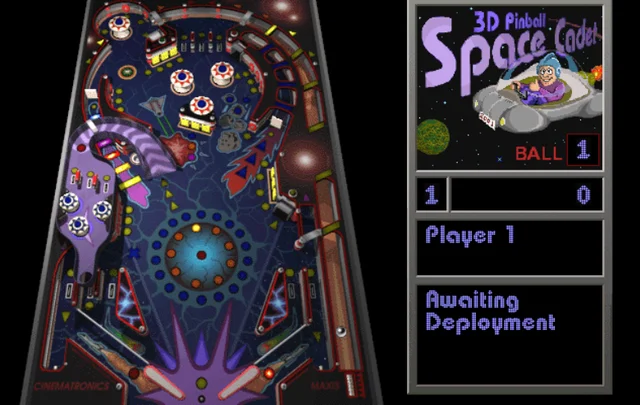
- 2026-11-17: hands-on test, result "pass" (Chrome 157 headless, Linux server, desktop viewport). Over https the page loads straight into the Windows-style Space Cadet table (original Cinematronics/Maxis-looking art, not a redraw) with no prompt or file request; F2 started a game, a held Space launched the ball, flipper keys were pressed, and the score rose from 0 to 16000 over two balls. The Game and Options menus open, but the Player Controls dialog did not show in screenshots and the Game menu stayed drawn after Esc; audio not heard (Sound and Music are ticked) and real-hardware performance not verified.
Credits: Engine decompilation by k4zmu2a; web port by alula.
lrusso's JavaScript and WebAssembly build
Open the browser version (external site)Report broken link
This title is not stored or hosted on this site: the button opens the hosting project's own website. Check any requirements listed below before you launch. We summarize details from that project's pages, and we cannot promise how it will run on your device.Report a problem or request removal.
- Hosted by
- lrusso
- Runs on
- JavaScript and WebAssembly build based on alula's port
- Controls
- Keyboard
- Saving
- Not tested; the build wrote nothing to browser storage in our test.
- Documentation
- Project documentation
- Our last test
- 2026-11-17: hands-on test, result "pass" (Chrome 157 headless, Linux server, desktop viewport). The page shows its own controls (Z left flipper, C right flipper, X tilt, Space launch, R restart, T sound) and a play button; one click loads the original-looking Space Cadet table, and Space plus Z/C took the score from 0 to 7000 with the on-screen prompt changing to 'Hit Mission Targets To Select Mission'. It asks for no files and no login; saving, mouse, audio and real-hardware performance were not tested or verified.
Credits: Engine by k4zmu2a, web port by alula, this build by lrusso.
Open Cadet: open-source engine with its own table art (on ExeBrowser)
Open the browser version (external site)Report broken link
This title is not stored or hosted on this site: the button opens the hosting project's own website. Check any requirements listed below before you launch. We summarize details from that project's pages, and we cannot promise how it will run on your device.Report a problem or request removal.
- Hosted by
- Open Cadet (andrewnakas), hosted on ExeBrowser
- Runs on
- Open-source pinball engine in WebAssembly, with its own table art and sounds
- Controls
- Keyboard, Mouse, Touch
- Saving
- Not tested: saving and high scores.
- Documentation
- Project documentation
- Our last test
- 2026-11-17: hands-on test, result "partial" (Chrome 157 headless, Linux server, desktop viewport). After one click on Play the table loads inside an iframe on the host page with a dark neon redraw (visibly not the Windows art), no files or login asked; clicking the table and holding Space changed the panel from 'Awaiting Deployment' to 'Hit Mission Targets To Select Mission'. The redraw shows no score digits in the panel and flipper response, mouse, touch, saving and audio were not clearly observed; real-hardware performance not verified.
Credits: Engine by k4zmu2a. Table art and sounds by andrewnakas. Not affiliated with the makers of the Windows table, as the project itself states.
What Space Cadet Pinball is
If you are searching for Space Cadet Pinball online, you are looking for the pinball table that came with Windows from the mid-1990s through Windows XP. It is one table from Full Tilt! Pinball, a 1995 game developed by Cinematronics and published by Maxis, and a Space Cadet-only version shipped with Windows. In the game you play a member of a space fleet who completes missions to climb a ladder of ranks.
This page is a catalogue entry. We do not host or run the game. Below are the browser routes, the rules and controls our sources document, and what we saw when we played all three routes on November 17, 2026. We mark every point we did not verify.
Playing it in your browser
The launch card above lists three projects. All three run in a browser tab, and all three loaded and played for us on November 17, 2026. None showed a consent banner, advert, sign-in or file prompt.
- alula’s port. A WebAssembly build, made with Emscripten, of the open-source SpaceCadetPinball engine. It loads over https in about four seconds in a Windows-style window with Game, Options and Help menus. The table looks like the original Windows one: Cinematronics and Maxis marks are visible and the side panel carries the original “3D Pinball Space Cadet” artwork. Its page states no requirements.
- Open Cadet. The same kind of engine, hosted on ExeBrowser, with its own table art and sounds written for the project. One click on the play button loads it in an iframe. The table is a dark, neon-blue redraw with a different side panel and no Cinematronics or Maxis marks, so it is visibly a variant. Its page asks only that you click the game to capture input.
- lrusso’s build. A single-file JavaScript and WebAssembly build based on alula’s port, with the music turned off and the menu hidden. It opens on a start page with a red play button and a controls list; one click loads the table in about five seconds. The table looks like the original Windows one, with Cinematronics and Maxis marks visible. Its page states no requirements.
Test limit: tested in headless Chrome on a Linux server. Not verified on any route: sound, mouse flippers, touch and mobile, saving and high scores, speed on real hardware, other browsers. On alula’s route the Game dropdown stayed drawn over the table until we opened another menu, while the game kept running; that may be a quirk of our headless setup.
Game rules and how it works
What our sources document about the Space Cadet table:
- Missions. You accept a mission by hitting the mission targets and going up the launch ramp.
- Targets. Each mission asks for a set number of things. One described example is hitting the four attack bumpers at the top of the table eight times. Some missions have steps that must be done in order.
- Ending a mission. A mission ends when you complete it or when the fuel lights run out.
- Ranks. Completing a mission lights some of the blue lights in a circle in the middle of the table. When all of them are lit, your rank rises and a light in the orange circle turns on. There are nine ranks, from lowest to highest: Cadet, Ensign, Lieutenant, Captain, LT Commander, Commander, Commodore, Admiral and Fleet Admiral.
- Rewards. In the Windows version, finishing a mission gives bonus points. In the Maxis version it also gave a ball save.
Mission names, point values and scoring details are not verified, and we found no source we trust to cite for them, so we leave them out rather than guess.
Controls
In our test, F2 started a new game and hold-and-release Space launched the ball on alula’s route and on Open Cadet. Z and / scored on alula’s route (we cannot say which flipper scored which points). On Open Cadet the panel changed to the mission prompt after Space, but we could not read a score there. The right flipper differs by route, so check the one you open.
| Action | alula and Open Cadet | lrusso |
|---|---|---|
| Plunger | Hold Space to charge it, release to launch | Space |
| Left flipper | Z, or left mouse button | Z |
| Right flipper | / (forward slash), or right mouse button | C |
| New game | F2 | R (restart) |
| Pause | F3 | Not listed |
| Release the mouse | Esc (Open Cadet’s page) | Not listed |
| Tilt the table | Not listed | X |
| Sound on or off | Not listed | T |
| Touch screens | On-screen buttons (Open Cadet’s page) | Not listed |
Mouse and touch entries come from the Open Cadet host page and were not tested. The lrusso keys are the ones its start page lists; we tried only Space, Z and C there. On alula’s route the menus print only F2 and F3. Its Player Controls item (F8) paused the game but showed no dialog in our headless test, so we cannot report that route’s full key list.
Tips and tricks
The sources document very little strategy. The last three tips are about controls only, from our own play-test.
- A mission can end early: the fuel lights under the launch ramp go out one by one. Rolling the ball over them relights them, and another trip up the launch ramp relights all of them at once. Documented, Full Tilt! Pinball on Wikipedia.
- Rank goes up only when every light in the blue circle in the middle of the table is on, so finishing missions is the way to promotion. Documented, Full Tilt! Pinball on Wikipedia.
- Some missions have steps that must be done in order. Documented, Full Tilt! Pinball on Wikipedia.
- Our own play-test: on alula’s route and on Open Cadet, click the table, press F2 for a new game, then hold Space and let go to launch the ball. On alula’s route F3 pauses (“Game Paused, F3 to Resume”).
- Our own play-test: on lrusso’s build the right flipper is C, not /, as its start page says. Z is still the left flipper.
- Our own play-test: after the ball drains, alula’s panel shows the next ball and “Awaiting Deployment” again, so launch with Space again.
History in brief
Full Tilt! Pinball came out in 1995 with three tables: Space Cadet, Skulduggery and Dragon’s Keep. The Space Cadet-only version went to Windows through Microsoft Plus! 95, then Windows NT 4.0, 2000, Me and XP. XP was the last client release of Windows to include it. Full Tilt! offers three resolutions up to 1024 by 768.
Microsoft engineer Raymond Chen has said he removed the game from Windows during early 64-bit work because its collision detector was broken on 64-bit Alpha AXP hardware. In the 2020s a decompilation project led to many unofficial ports, including the engine behind the routes on this page.
FAQ
Can I play Space Cadet Pinball online?
Yes, through the three browser routes above. All three loaded and let us launch a ball on November 17, 2026, and pages like these can change or disappear.
Can I play it on Windows 10, Windows 11 or a Mac?
The original ran on Windows up to XP. The three browser routes ran in Chrome 157 on a Linux server in our test; we did not try Windows, macOS, other browsers or mobile devices, so those are not verified.
What is the difference between Space Cadet and Full Tilt! Pinball?
Full Tilt! Pinball has three tables and higher resolutions. The Windows Space Cadet version has one table and a 640 by 480 display. Gameplay differs in small ways, such as what a finished mission awards.
Is Open Cadet the same game?
No. It uses the same kind of engine but different art and sound, and the table looks clearly different from the Windows one. We did not compare how it plays.
Does it have online multiplayer?
None of the pages we reviewed documents online multiplayer, and we saw no multiplayer option. Online play is not verified.
Sources and credits
- Wikipedia, “Full Tilt! Pinball” (history, table, ranks and missions): https://en.wikipedia.org/wiki/Full_Tilt!_Pinball
- Raymond Chen, “Filling in some gaps in the story of Space Cadet Pinball on 64-bit Windows” (2022): https://devblogs.microsoft.com/oldnewthing/20220106-00/?p=106122
- SpaceCadetPinball decompilation by k4zmu2a: https://github.com/k4zmu2a/SpaceCadetPinball
- Emscripten port by alula: https://github.com/alula/SpaceCadetPinball
- Open Cadet by andrewnakas: https://github.com/andrewnakas/open-cadet
- Open Cadet host page (controls): https://exebrowser.com/run/space-cadet-open/
- lrusso’s browser build: https://github.com/lrusso/3DPinballSpaceCadet
- alula’s browser build, as tested: https://pinball.alula.me/
- Our own play-test of all three routes, November 17, 2026, in Chrome 157.
Space Cadet Pinball and Full Tilt! Pinball are the work of their original developers and publishers; we are not affiliated with them. Every claim above comes from the sources listed or from our own play-test, and anything marked unverified has not been tested by us.
More games
Doom
MS-DOS · 1993 · First-person shooter
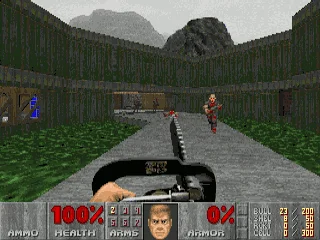
id Software's 1993 shooter, where a lone space marine fights through Mars moon bases and into hell. This page lists two browser routes for the DOS original, its rules and keyboard controls, and what we saw when we played both on November 17, 2026.
Minecraft Classic
Web browser (Mojang's re-release of its 2009 version) · 2009 · Sandbox building
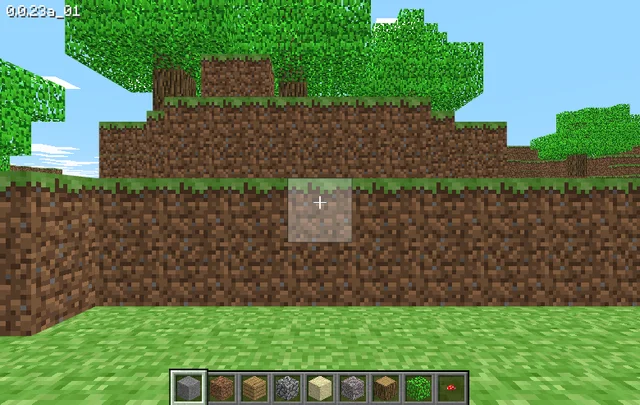
Mojang's browser re-release of the 2009 version of Minecraft, hosted by Mojang Studios at classic.minecraft.net. It needs a keyboard and offers 32 blocks to build with. We played it briefly on November 17, 2026.

The Oregon Trail
DOS (Deluxe edition, 1992) · 1992 · Educational simulation
MECC's wagon-trip simulation from the school computer lab. This page covers the 1990 and 1992 DOS editions that run in a browser, how the editions differ, the rules and tips from the 1985 manual, and what we saw when we tried both on November 17, 2026.
Wolfenstein 3D
DOS · 1992 · First-person shooter
A 1992 DOS first-person shooter from id Software in which an Allied spy fights his way out of a Nazi castle. This page points to two browser versions, what we saw when we played them on November 17, 2026, and the rules, controls and tips from the original manual.